
Yes, you can absolutely watch football on a Fire Stick! The Amazon Fire Stick is a versatile device that allows you to stream a wide variety of content, including live sports, directly to your TV. This means you can catch all the gridiron action, from the NFL to college football, with the right apps and subscriptions.
The world of football viewing has shifted dramatically, with more fans turning to streaming services to catch their favorite teams. The Amazon Fire Stick, with its user-friendly interface and access to a vast app library, has become a popular gateway for this. This guide will walk you through the various ways you can enjoy live sports on Firestick, ensuring you don’t miss a single touchdown, field goal, or crucial defensive stop. We’ll delve into the best sports channels on Firestick, explore popular streaming sports apps, and highlight specific services that offer the games you want to watch.
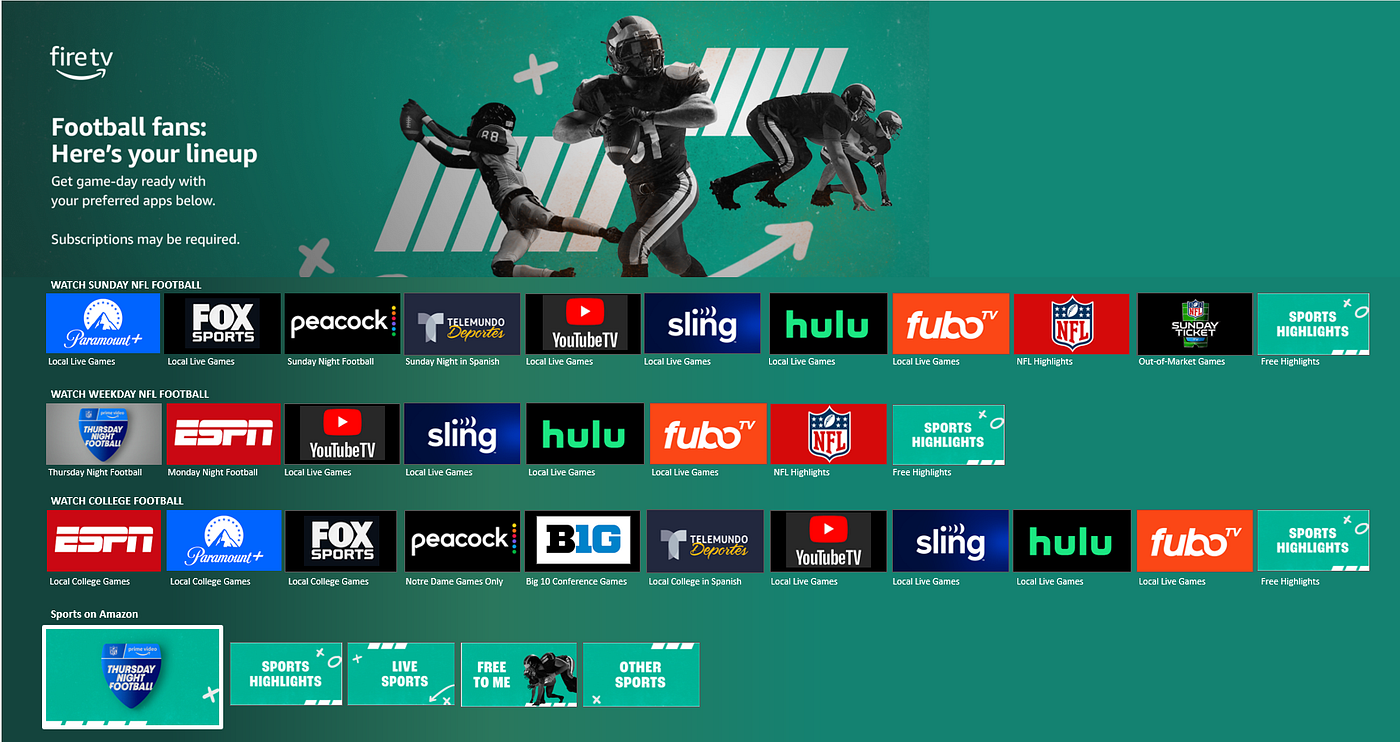
Image Source: miro.medium.com
Accessing Live Sports on Firestick: Your Options
The beauty of the Fire Stick lies in its adaptability. It acts as a portal to numerous streaming services, each offering a unique package of sports content. Whether you’re a die-hard NFL fan looking for NFL RedZone or a general sports enthusiast wanting access to a broad spectrum of games, there’s likely a solution for you.
Streaming Sports Apps: The Core of Fire Stick Football
At the heart of watching football on your Fire Stick are the dedicated streaming sports apps. These applications provide live feeds of games, analysis, highlights, and often much more. Some are free with ads, while others require a subscription.
-
ESPN App: For many, the ESPN app is a must-have. It provides access to a vast array of ESPN’s programming, including many college football games and some NFL content, depending on your cable or live TV streaming subscription. You’ll typically need to link your existing cable or satellite TV account, or a subscription to a qualifying live TV streaming service, to unlock the full live game access.
-
Peacock Streaming: NBC’s Peacock streaming service has become a significant player in sports broadcasting, notably securing exclusive rights to a selection of NFL games, including some Sunday Night Football matchups. This makes it an essential app for serious NFL fans who don’t want to miss any games, especially those played on NBC.
-
Amazon Prime Video: If you’re an Amazon Prime Video subscriber, you already have access to a growing amount of live sports. Amazon has been investing heavily in sports rights, including Thursday Night Football for the NFL. This means a Prime subscription can directly translate to watching live NFL games on your Fire Stick.
-
Hulu + Live TV: This service is a powerhouse for sports fans. Hulu + Live TV bundles live TV channels, including many sports-focused networks like ESPN, Fox, CBS, and NBC, with Hulu’s on-demand library. This gives you access to a huge range of football games, from college to professional, all within one app.
-
Sling TV: Sling TV offers customizable channel packages at competitive prices. Their “Orange” and “Blue” plans, and especially the “Sports Extra” add-on, can provide access to crucial sports channels that broadcast football. Depending on your location and the specific games you want to watch, Sling TV can be a very cost-effective option.
-
YouTube TV: Similar to Hulu + Live TV, YouTube TV offers a comprehensive live TV streaming experience. It includes major sports channels like ESPN, Fox, CBS, and NBC, making it an excellent choice for catching a wide variety of football games throughout the season. The DVR capabilities are also a big plus for recording games you can’t watch live.
How to Install Sports Apps on Your Fire Stick
Installing these streaming sports apps is straightforward:
- Navigate to the Appstore: From your Fire Stick’s home screen, go to the “Search” icon.
- Search for the App: Type in the name of the app you want (e.g., ESPN, Peacock, Sling TV).
- Select and Download: Choose the correct app from the search results and click “Get” or “Download.”
- Launch and Sign In: Once installed, you can launch the app. You’ll likely need to sign in with your existing subscription credentials (e.g., your cable provider login or your Peacock account details).
Specific Ways to Watch Football on Your Fire Stick
Let’s break down how to watch different types of football, focusing on key services and features.
1. The NFL and Thursday Night Football on Amazon Prime Video
For NFL fans, Amazon Prime Video has become indispensable. They hold exclusive rights to Thursday Night Football games. If you have an Amazon Prime subscription, you automatically get access to these games.
- Installation: The Amazon Prime Video app is usually pre-installed on Fire Sticks. If not, search for it in the Fire Stick Appstore and install it.
- Access: Open the Prime Video app, and you’ll find the NFL games listed prominently, especially on Thursdays during the season.
- Benefits: This is a convenient way to watch TNF without needing an additional subscription beyond your existing Amazon Prime membership.
2. Catching All the Action with NFL RedZone
NFL RedZone is a fan favorite for a reason. It provides continuous live whip-around coverage of every touchdown from every Sunday game. If you want to experience the most exciting moments from around the league, this is your go-to.
-
Where to Find NFL RedZone:
- YouTube TV: YouTube TV includes NFL RedZone as part of its “Sports Plus” add-on package. This is a popular and straightforward way to get it.
- Hulu + Live TV: Similar to YouTube TV, Hulu + Live TV offers NFL RedZone through its “Sports Add-on” package.
- Sling TV: Sling TV provides NFL RedZone as part of its “Sports Extra” package, which can be added to either the Sling Orange or Sling Blue base packages.
- NFL+ (with Premium Subscription): While the basic NFL+ app focuses on mobile, the premium tier might offer some RedZone-like features or allow streaming of certain games. However, for the dedicated RedZone experience on a Fire Stick, the live TV streaming services are generally better.
-
Installation and Subscription: You’ll need to subscribe to one of these live TV streaming services first. Then, install the corresponding app on your Fire Stick and subscribe to the relevant add-on package that includes NFL RedZone.
3. College Football Saturdays
College football Saturdays are often packed with incredible matchups. Many college games are broadcast on channels like ESPN, ABC, Fox, CBS, and others.
- ESPN App: As mentioned, the ESPN app is crucial for college football. Many games are exclusively on ESPN, ESPN2, ESPNU, or SEC Network, which are often accessible through the ESPN app if you have a qualifying TV subscription.
- Hulu + Live TV, YouTube TV, Sling TV: These services provide access to the core broadcast networks (ABC, Fox, CBS) and many of the dedicated sports channels (ESPN, Big Ten Network, SEC Network, etc.) that carry college football. This makes them excellent all-in-one solutions for college football fans.
- Fox Sports App / CBS Sports App: Sometimes, specific games might be available through the Fox Sports or CBS Sports apps directly, often requiring a login from a participating TV provider.
4. Sunday Night Football and Monday Night Football
-
Sunday Night Football: This is primarily broadcast on NBC. For Sunday Night Football, your best bets are:
- Peacock Streaming: NBC has exclusive streaming rights to some SNF games, making Peacock essential for those specific broadcasts.
- Hulu + Live TV, YouTube TV, Sling TV: These services include NBC in their channel lineups, allowing you to watch SNF games live if they are broadcast locally on NBC. You might also be able to stream via the NBC app or Peacock with these subscriptions.
-
Monday Night Football: This iconic series is typically aired on ESPN and ABC.
- ESPN App: Essential for games on ESPN.
- Hulu + Live TV, YouTube TV, Sling TV: These services provide both ESPN and ABC, ensuring you can catch all Monday Night Football games.
5. Other Football Leagues and International Football
While the NFL and college football are the most popular in the US, your Fire Stick can also be a gateway to other leagues.
- International Leagues (e.g., Premier League, La Liga): Many international football leagues are streamed through services like Peacock (for Premier League in the US), ESPN+, Paramount+, or dedicated international sports apps. Research which service holds the rights to the league you’re interested in.
- Canadian Football League (CFL): Games are often broadcast on ESPN2 or ESPN+.
- XFL/USFL: These leagues have had various broadcast partners, so check the current season’s broadcast agreements. Often, games are available on Fox, ESPN, or streaming services.
Navigating the Fire Stick for Sports
Here’s how to make the most of your Fire Stick for live sports on Firestick:
Creating a Seamless Viewing Experience
- Organize Your Apps: Pin your favorite streaming sports apps to the Fire Stick’s main menu for quick access. Press and hold the home button, then select “Apps,” find the app, and choose “Pin to Favorites.”
- Use Voice Search: The Fire Stick’s remote has a voice search function. Simply press the microphone button and say, “Open ESPN app,” “Watch NFL RedZone,” or “Show me football games,” and the Fire Stick will do its best to take you there.
- Check Wi-Fi Strength: For smooth streaming, ensure your Wi-Fi connection is strong and stable. A weak signal can lead to buffering and dropped connections, ruining the game-watching experience.
Important Considerations for Football Streaming
- Subscription Costs: Be mindful of the various subscription costs. Bundling services like Hulu + Live TV or YouTube TV can be cost-effective if you watch a lot of different sports and channels. If you’re only interested in specific games (like TNF), Amazon Prime Video might be enough.
- Blackout Rules: Be aware of local blackout rules, especially for NFL games. Sometimes, if a game is being broadcast on a local network channel, streaming services might black it out in your area unless you have a local feed.
- App Updates: Keep your apps updated to ensure you have the latest features and bug fixes. The Fire Stick usually prompts you for updates, or you can check manually in the “Apps” section.
- Geo-Restrictions: Some streaming sports apps may have geo-restrictions. Ensure the service you subscribe to is available in your region.
Deciphering Subscription Packages for Football Fans
Choosing the right subscription can feel overwhelming with so many options. Here’s a simplified breakdown of popular choices for football fans:
| Service | Key Football Content | Pros | Cons | Best For |
|---|---|---|---|---|
| Amazon Prime Video | Thursday Night Football (NFL) | Included with Prime membership; easy access | Limited live sports beyond TNF; no NFL RedZone | Casual NFL fans who have Prime and want to watch TNF. |
| Peacock | Select NFL games (NBC broadcast), Premier League (UK) | Exclusive NFL content; affordable | Limited overall sports coverage | NFL fans who want specific NBC games and Premier League fans. |
| ESPN App | College Football, some NFL, other sports (requires separate TV provider/streaming login) | Extensive college football coverage; access to many ESPN-branded channels | Needs another subscription to unlock full live content | College football enthusiasts; users with existing cable/streaming. |
| Hulu + Live TV | NFL (local CBS, Fox, NBC, ESPN), College Football, NFL RedZone (with Sports Add-on), many other sports channels | Bundles live TV with on-demand; comprehensive sports package; includes local channels | Can be more expensive than standalone streaming services | All-around sports fans, especially NFL and college football followers. |
| Sling TV | NFL (via Fox, CBS, NBC depending on package), College Football (via ESPN, Fox, etc.), NFL RedZone (with Sports Extra) | Customizable packages; often more affordable base prices; good for specific channel needs | Base packages might not have all desired sports; add-ons increase cost | Budget-conscious sports fans who want to pick and choose channels. |
| YouTube TV | NFL (local CBS, Fox, NBC, ESPN), College Football, NFL RedZone (with Sports Plus), many other sports channels | Unlimited DVR; includes local channels; comprehensive sports lineup | Generally more expensive than Sling TV | Sports fans who want a complete package with premium features like DVR. |
Frequently Asked Questions (FAQ)
Q1: Do I need a separate subscription for each football app on my Fire Stick?
A1: Not necessarily. Many streaming sports apps like ESPN, Fox Sports, or CBS Sports require you to link an existing cable or live TV streaming subscription (like Hulu + Live TV, YouTube TV, or Sling TV) to access live games. Apps like Amazon Prime Video and Peacock offer content directly with their own subscriptions.
Q2: Can I watch the Super Bowl on my Fire Stick?
A2: Yes! The Super Bowl is broadcast on one of the major networks (CBS, NBC, Fox) each year. Whichever network has the rights will typically stream the game on their respective app (e.g., Peacock for NBC, Fox Sports app for Fox, Paramount+ for CBS) or through the live TV streaming services that carry those networks.
Q3: Is NFL RedZone available on Fire Stick without a cable subscription?
A3: You cannot get NFL RedZone through a standalone app directly on the Fire Stick without a qualifying subscription. You need to subscribe to a live TV streaming service like YouTube TV, Hulu + Live TV, or Sling TV that offers NFL RedZone as part of a package or add-on.
Q4: Will my internet speed affect my football streaming quality?
A4: Absolutely. For smooth HD streaming, it’s recommended to have at least 5-10 Mbps download speed. For 4K streaming, you’ll need significantly more. A stable and fast internet connection is crucial for enjoying live sports on Firestick without constant buffering.
Q5: Can I watch games on my local channels through my Fire Stick?
A5: Yes, most live TV streaming services available on the Fire Stick (Hulu + Live TV, YouTube TV, Sling TV, etc.) include local channels like ABC, CBS, Fox, and NBC in their packages, depending on your geographical location. This is essential for watching games broadcast on those networks.
By leveraging the power and versatility of the Amazon Fire Stick and choosing the right streaming sports apps, you can ensure you never miss a moment of football action. From the thrill of NFL RedZone to the excitement of college Saturdays, your Fire Stick is your ticket to the gridiron.